


Does the 2026 Honda CR-V Hybrid or 2026 Hyundai TUCSON Hybrid offer a more intuitive tech experience for Canton, OH drivers?
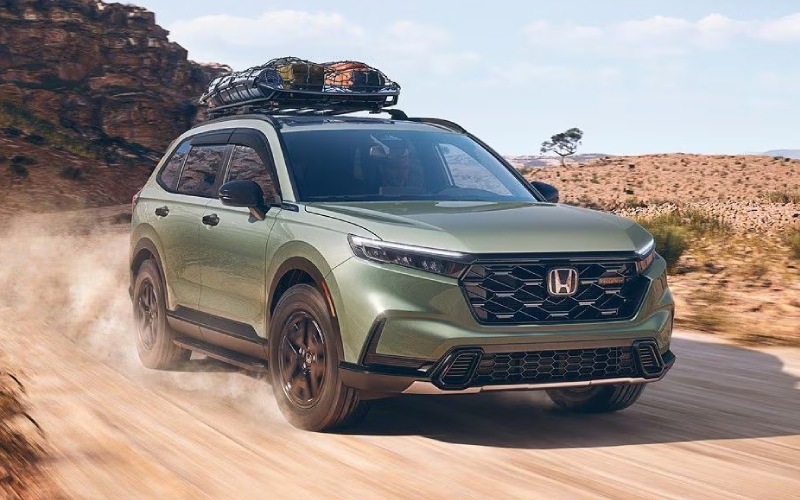
Parkway Honda – Does the 2026 Honda CR-V Hybrid or 2026 Hyundai TUCSON Hybrid offer a more intuitive tech experience for Canton, OH drivers?
Shoppers often ask a simple question with big everyday implications: which infotainment system feels more natural to live with, the 2026 Honda CR-V Hybrid or the 2026 Hyundai TUCSON Hybrid? If you drive busy corridors around Canton, OH, juggle podcasts and playlists, and rely on turn-by-turn directions for unfamiliar side streets, the way your SUV handles maps, voice control, and smartphone integration can make or break the experience.
Both models bring modern hardware to the table, but their software approaches differ in meaningful ways. The CR-V Hybrid’s Sport Touring Hybrid trim features Google built-in, which places Google Maps and Google Assistant directly in the vehicle. The TUCSON Hybrid integrates a crisp 12.3-inch touch-screen backed by Bluelink connectivity, wireless Apple CarPlay® and Android Auto™, and an available 12.3-inch digital instrument cluster. Below, we unpack the daily-life differences so you can decide which path lines up with your routine.
What Google built-in changes in the CR-V Hybrid
Because Google built-in lives natively in the vehicle (no phone required), key features are just a command away. Say, “Hey Google, find the closest parking near Monument Square,” and the system pulls options, traffic, and estimated arrival without pairing a device. Maps are integrated with the vehicle’s sensors, which helps with more accurate energy flow projections on longer drives. Add Google Play support for select apps, and it feels less like a mirrored phone and more like an embedded ecosystem that works the moment you start the car.
Voice control is central to the experience. Google Assistant recognizes natural phrasing, so you can keep your hands on the wheel and your eyes on the road. In practice, this means fewer taps and menus when you need to reroute around construction on local arteries or ask for a coffee stop near the Pro Football Hall of Fame on the way back from an appointment.
How the TUCSON Hybrid’s interface stacks up
The TUCSON Hybrid answers with a beautiful, expansive 12.3-inch touch-screen on every trim. Wireless Apple CarPlay® and Android Auto™ are supported, so you can still talk to Siri or Google Assistant through your connected phone. The advantage here is familiarity—your apps, your layout, and your media are exactly how you left them. Hyundai’s Bluelink also brings remote start, door lock/unlock, and more from your smartphone, which can be a big convenience in tightly packed lots near downtown.
In day-to-day use, the TUCSON’s hardware is a strong suit. The large real estate makes at-a-glance info easy to catch, and the available 12.3-inch digital cluster adds a cohesive look. If you are committed to living in your phone’s ecosystem, this setup can still be seamless—just remember you will rely on your device for deep integration, where the CR-V Hybrid’s top trim is built around the native Google experience.
Navigation and local confidence
Both SUVs get you where you are going. The main difference lies in how many steps it takes. With Google built-in on the CR-V Hybrid Sport Touring, you can store frequent places, add stops by voice, and trust familiar Google Maps visuals right in the dash. The TUCSON Hybrid mirrors navigation from your phone (or uses its own embedded system where equipped), which works well, too, but introduces more variables—phone battery level, Bluetooth quirks, or cable misplacements if you choose wired connections.
Drivers who make frequent, split-second choices—detouring around a sporting event or skirting a backed-up stretch near Belden Village—often appreciate the immediate voice-to-action pipeline you get in the CR-V Hybrid’s Google-centric setup.
Driver-assist tech: smoothness matters
Infotainment is only half the equation; the way driver-assist systems interact with that information can shape perceived comfort. The CR-V Hybrid includes Honda Sensing® on all trims, with Adaptive Cruise Control with Low-Speed Follow and Lane Keeping Assist System delivering subtle corrections and measured following distances. In the TUCSON Hybrid, Hyundai SmartSense brings forward collision avoidance, lane support, and more, with advanced tools like Surround View Monitor available on higher trims. Both are robust suites; the distinction many drivers notice is the calm, unhurried rhythm of Honda’s tuning when traffic density fluctuates.
Pair that with the CR-V Hybrid’s available Real Time AWD™ for variable traction, and the daily “flow” of the drive can feel just a touch more predictable—especially on mixed pavement common to neighborhood cut-throughs and arterial transitions.
Everyday usability: cords, charging, and quick tasks
Both SUVs provide wireless charging and wireless smartphone integration on select trims, meaning you can reduce dashboard clutter. The CR-V Hybrid’s interface keeps core controls intuitive—audio, nav, phone—so it takes fewer taps to get what you need. TUCSON Hybrid’s large screen gives you lots of space to work with, and Hyundai’s menu structure is tidy once you learn it.
If your top priority is an infotainment system that feels “built-in” rather than “connected,” the CR-V Hybrid Sport Touring’s Google built-in makes a compelling case. If you are already deeply invested in your smartphone ecosystem and want the largest possible canvas for apps, the TUCSON Hybrid layout is appealing, too.
Frequently Asked Questions:
Can I use voice commands without my phone in the 2026 Honda CR-V Hybrid?
Yes, on the Sport Touring Hybrid, Google built-in enables Google Assistant right in the vehicle, so you can set destinations, make calls, and manage tasks without connecting a device.
Does the 2026 Hyundai TUCSON Hybrid support wireless smartphone integration?
Yes. It supports wireless Apple CarPlay® and Android Auto™, allowing you to access your preferred apps, maps, and voice assistant via your phone.
Which system is faster to use for quick detours?
Both respond quickly; the CR-V Hybrid’s native Google built-in offers an edge for hands-free rerouting with familiar Google Maps commands, while the TUCSON Hybrid leverages your phone’s assistant for similar tasks.
How do the driver-assist suites differ?
Honda Sensing® (standard on every CR-V) and Hyundai SmartSense (standard across TUCSON Hybrid trims) both provide collision mitigation and lane support; many drivers find Honda’s tuning particularly smooth in dense traffic.
Choosing between these two comes down to whether you want a native Google ecosystem baked into the dash or prefer a wide, phone-forward interface. Visit Parkway Honda, serving Canton, Massillon, and Wooster, to sample both styles back-to-back and decide which approach matches your daily rhythm. If you value the simplicity of asking for directions, adding a stop, and seeing it all update instantly, the CR-V Hybrid Sport Touring’s Google built-in is tough to beat. If your preference is to keep your phone as the driver of your in-vehicle experience, the TUCSON Hybrid gives you the space and support to make that work comfortably.
Whichever you lean toward, remember to evaluate voice recognition, screen readability at a glance, and the number of taps it takes to reach your top three functions. Layer that with how the driver-assist systems behave on your typical routes, and you will have a clear picture of which SUV will keep your drives less stressful and more enjoyable for the miles ahead.
0 comment(s) so far on Does the 2026 Honda CR-V Hybrid or 2026 Hyundai TUCSON Hybrid offer a more intuitive tech experience for Canton, OH drivers?